The short answer
I run a Shopify and CRO agency, so you’d expect me to say yes. My honest answer is: it depends on your revenue, and for a lot of stores the answer is no.
If your store makes less than about $10,000 a month, don’t hire me or anyone like me. Fix the basics yourself first. I’ll show you exactly which ones below. If you’re above that, and you’ve already tried fixing it yourself or with a general agency, then yes, a CRO specialist usually pays for itself. The rest of this post shows you why, with real tests from our clients, including one that went wrong.
When you should not hire anyone
If you get 3,000 to 4,000 visitors a month and make $3,000 to $5,000, hiring a CRO agency makes no sense. Our fee would be close to, or higher than, your monthly revenue. And with that little traffic, it’s hard to run real tests. You’d wait months to know if a change worked.
Our impact becomes visible from about $10,000 to $15,000 a month. The simple maths: at $10,000 a month, a 20% lift in conversion rate is roughly $2,000 more revenue every month, and it keeps paying after the project ends. Below that level, the same 20% is a few hundred dollars, and the project never pays back. (An illustration, not a client result.)
What to fix yourself first
If you’re under that line, you can get most of the early gains on your own. Go through your front page, collection pages, product pages and cart, and check these:
- Easy to navigate. Can a new visitor find a product in two or three taps on mobile?
- Shipping and delivery. Cost and delivery time visible before checkout, not hidden in a footer page.
- Returns and satisfaction guarantee. Say it near the add-to-cart button.
- Proof. Reviews, testimonials, happy customers, and an About us page that shows real people.
- Payment. Show the payment methods you accept and any installment option.
- One upsell. A simple, relevant add-on in the cart or on the product page.
- Consistency. The same fonts, text sizes and button styles everywhere. Mismatched buttons make a store look untrustworthy.
None of this needs an agency. It needs an afternoon and a critical look at your own store on your phone.
Case: the size selector that cost Sneakerzone sales
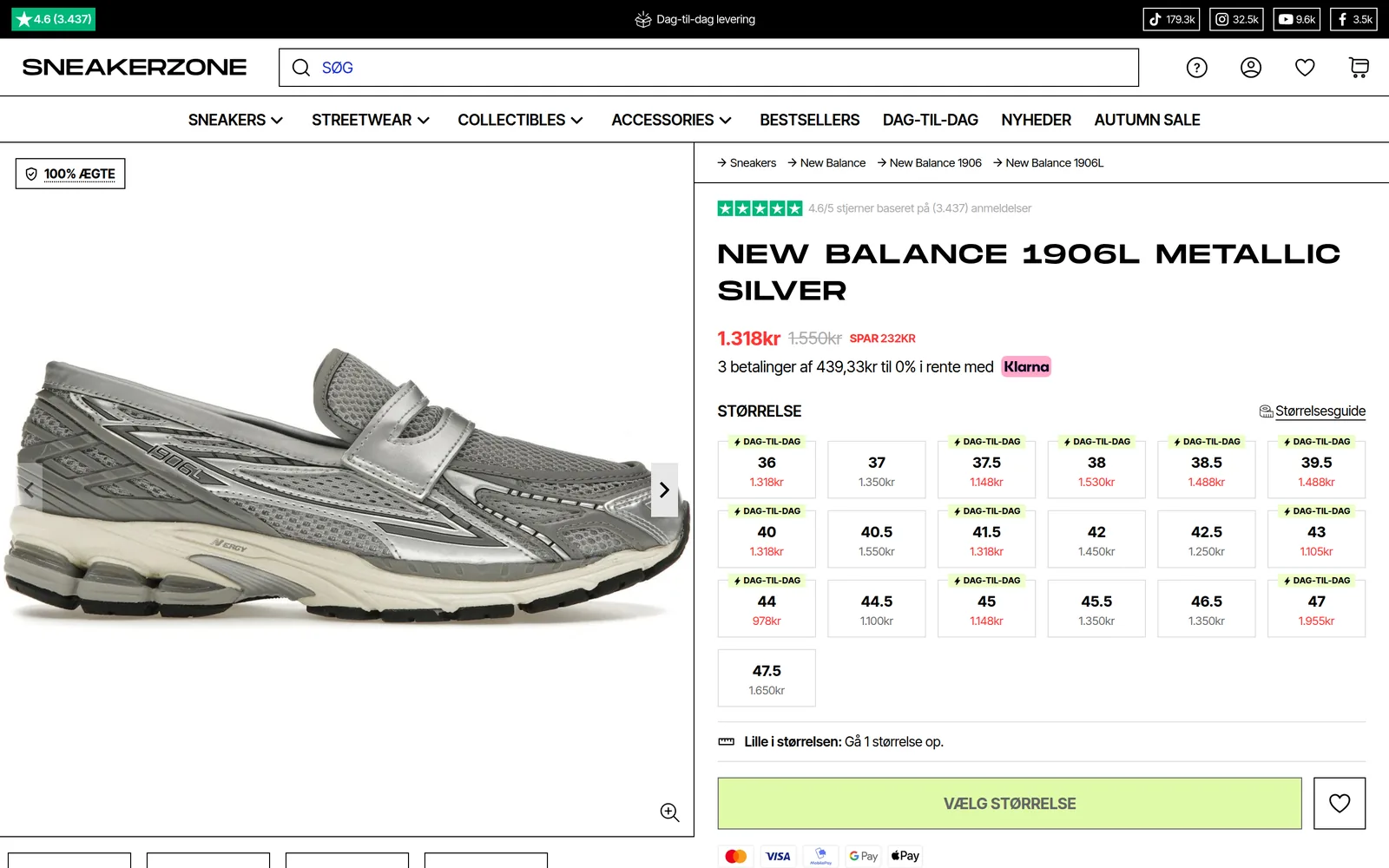
Sneakerzone had already done what most store owners do. They tried to fix their conversion rate themselves. Then they hired an agency. Then they came to us.
The first time I opened their site, I saw the problem within a minute. The size selector was a dropdown, and it was hard to understand. Some sizes were in stock. Others were preorders. From the dropdown, you couldn’t tell which was which until you had already picked one. Customers were confused, and a lot of them ordered the wrong thing. Sneakerzone had a very high return rate, which eats your margin even when the sale goes through.
What we changed
- Dropdown to buttons. Every size is now a visible button. No extra tap to open a list.
- A green dot for in stock. Each size that ships now has a small green dot inside the button. You know before you click.
- “Preorder” shown up front. Sizes that aren’t in stock say “Preorder” right on the button, before you even hover over them.
That’s it. No redesign, no new theme. Three small changes to one element.
What happened
The test ran for about 20 days, and it was a clear winner. More shoppers clicked through on a size, fewer ordered something they didn’t expect, and returns went down.
The size selector was one of the tests in our A/B testing programme with Sneakerzone, which lifted their conversion rate by 277% and brought in more than DKK 5.6 million in extra revenue over 12 months. Read the full Sneakerzone case.
What this tells you about hiring help: Sneakerzone’s problem wasn’t hard to fix. It was hard to see, because they looked at their own store every day. An outside specialist’s main value is noticing what you stopped noticing, then proving it with a test instead of an opinion.
The test that surprised me: pictures in the mobile menu
Look at almost any Shopify store’s mobile menu. It’s a list of text links with a few dropdowns. Everyone has the same one, so nobody thinks to test it.
We tested it on Collector’s Cage. We added images to the menu and to every dropdown, and we put reviews inside the menu itself. I expected a small effect. Instead, click-through from the menu went up straight away.
If you open Collector’s Cage on your phone today, you’ll see a menu full of images. That’s the result of the test. We’ve since run the same idea on other stores, and every time the impact was positive.
Why it works, as far as I can tell: on mobile, the menu is where a lot of shoppers start browsing. A word like “Accessories” tells you little. A picture tells you what you’re about to see, and a review tells you other people bought it. The shopper does less guessing, so they tap more.
What this tells you about hiring help: the biggest wins often sit in places that “everybody does the same way”. A good CRO partner tests the boring parts of your store, not only the hero banner.
Our failure: a beautiful redesign that didn’t convert
Not every project works. Here’s one that didn’t.
We did a complete redesign for a client. New look, every page rebuilt, then launched. The conversion rate was no better than before.
The reason was simple, and it was partly on us. The client had a long list of things they wanted changed, and we built them. They were things the client liked. They weren’t things the data said would help customers buy. So we launched a store that looked better to the owner and worked no better for the shopper.
To fix it, we had to remove a lot of what we’d just built. It took time before the conversion rate finally went up.
The lesson I took from it: design decisions should come from data, not from what looks nice. Today, before I change anything on a new version of a store, I make sure I have plenty of data from the live store. Past data never lies. Taste does, including mine.
What this tells you about hiring help: if an agency’s first move is a full redesign without looking at your analytics, be careful. Ask them what in your current data the redesign is fixing. If they can’t answer, you’re paying for their taste.
What a good CRO partner does in the first weeks
That failure changed how we start every project. This is our order of work:
- Access and setup. We make sure we can see everything we need, and we set up our own systems so we can measure.
- Data first. We look at past data before we form a single opinion.
- Hypotheses. We write down 5 to 10 things we want to test, each with a reason from the data.
- Design. We design a version for every hypothesis.
- Build. We implement each version in the store.
- Test. Only then do we start testing, and we keep a change only if it wins.
If an agency skips straight from setup to building, you’ve hired a web designer, not a CRO partner.
How to check who you’re hiring
Pricing depends on the store and the setup: a first project, or a 3- or 6-month collaboration. Whoever you talk to, check these before you sign:
- Ask what they would fix, and why. A good partner points at something specific in your data or on your store, like Sneakerzone’s size selector. A weak one talks about “a fresh, modern look”.
- Ask for a test that failed. Everyone who tests has losers. If they claim they’ve never had one, they aren’t testing.
- Read real case studies. Look for the starting point, what changed, how long it ran and the result. A single big percentage with no context proves little.
- Check reviews outside their own site. Trustpilot and the founder’s LinkedIn tell you more than the testimonials page.
- Ask what happens if it doesn’t work. How they answer tells you how confident they are in their own method.
You can hold us to the same list. Our reviews are on Trustpilot, and our case studies include video testimonials from the store owners.
Why conversion rate is the number to fix first
Where most store owners get it wrong is treating conversion rate as a quick fix that works here and now. They don’t see what it does over time. I think it’s the most important metric on your store.
You can drive as much traffic as you like. If your conversion rate is low, you’re paying for visitors who leave, and losing revenue from people who came ready to buy. Conversion rate is about how people actually shop on your store. Improve it, and every other number moves with it. Every ad you run gets cheaper per sale. Customers understand your business faster, browse more easily and buy more.
So, should you hire someone to fix your conversion rate? If you’re under $10,000 a month, start with the checklist above and do it yourself. If you’re above it and you’ve already tried, find someone who starts with your data, tests every change and will tell you when a test failed.
Want to know if your store is ready? Request a growth audit.